

Key Takeaways
- Consolidating online accounts in a single browser window enhances productivity, organization, and focus.
- Specialized browsers and management tools can streamline multi-account and multi-app workflows.
- Simple practices, such as creating browser profiles, using password managers, and implementing robust security measures, safeguard your digital workspace.
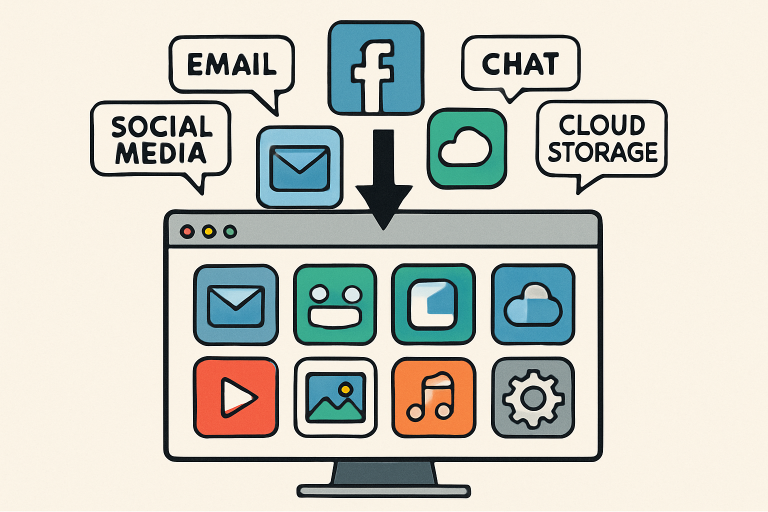
Table of Contents
- Challenges of Managing Multiple Online Accounts
- Benefits of Consolidating Online Activities
- Tools and Browsers for Multi-Account Management
- Best Practices for Efficient Online Management
- Security Considerations
- Conclusion
Keeping up with a growing number of online accounts, tools, and apps can drain your time and distract you from your focus. With logins scattered across browsers, and personal and professional tasks competing for tab space, it’s easy to feel overwhelmed. Fortunately, a new class of specialized browsers and digital tools is making it possible to manage your digital life in a single, organized workspace. Check out Shift browser reviews on G2 to see how users are handling account management headaches.
This guide explores how you can enhance your productivity, reduce clutter, and boost your online security by consolidating your digital workflow into one browser window. By understanding the right strategies and leveraging modern apps purpose-built for multi-account management, you can reclaim control over your online experience and make your digital life significantly more manageable.
Whether you’re a freelancer toggling between client profiles, a social media manager tracking multiple brands, or just someone looking to declutter their routine, these tips, tools, and best practices will help you work smarter, not harder.
According to cybersecurity experts at CNET, a thoughtful approach to browser organization and app management can also minimize security risks associated with scattered logins and weak passwords.
Challenges of Managing Multiple Online Accounts
Modern digital life often requires the use of dozens of online accounts—such as work emails, personal banking, social media, cloud drives, and project management tools, to name a few. Attempting to keep these accounts organized using traditional browsers presents several common challenges:
- Constant account switching: Logging in and out to separate work and personal profiles can result in wasted time and reduced productivity.
- Account confusion: Accidentally posting, emailing, or storing information in the wrong account can have real consequences, especially with sensitive or professional data.
- Missed alerts and updates: Notifications buried in unrelated tabs or windows make it easy to overlook essential updates, deadlines, or conversations.
Over time, these roadblocks create a chaotic workflow, reduce your efficiency, and increase stress across your digital routine.
Benefits of Consolidating Online Activities
Taking steps to bring all your accounts and tools into one manageable browser window delivers significant advantages:
- Enhanced productivity: Fewer distractions and streamlined access enable you to move seamlessly between apps and accounts, maintaining your train of thought and making your daily workflow more efficient.
- Better organization: Keeping everything in one digital space allows you to dedicate browser profiles or tab groups to specific purposes—such as work, finance, entertainment, or health—helping you stay organized and focused.
- Minimized distractions: By reducing the urge to hop between unrelated profiles or apps, you’re less likely to get sidetracked by non-essential notifications or tasks.
Ultimately, consolidation supports a healthier relationship with your digital life and enables a smoother, more intentional workday.
Tools and Browsers for Multi-Account Management
Specialized browsers and add-ons are revolutionizing how users manage multiple accounts. Some of the top solutions include:
- Shift Browser: Built from the ground up for multi-account users, Shift lets you seamlessly connect Google accounts, social media, Slack, email, and hundreds of web apps in dedicated workspaces—all within a single window. Each account remains isolated and easily accessible with just a click. Check out Shift browser reviews on G2 to see how users are handling account management headaches.
- SmartWindows: Designed for high-volume users, SmartWindows allows you to create separate browser profiles, each with its saved sessions, display configurations, and tab groups. This is especially valuable for remote workers or social media professionals who need to keep client accounts distinct but accessible. More features are detailed in their own guide for social media managers.
For those looking to explore even more advanced solutions, Mozilla Firefox’s “Multi-Account Containers” extension is worth considering, as highlighted in recent coverage by The New York Times on browser extensions.
Best Practices for Efficient Online Management
A few smart habits can further streamline your multi-account setup. Consider these recommendations:
- Create browser profiles: Many browsers let you maintain separate logins and sessions, so you can separate work from personal activities or dedicate profiles to different projects.
- Use a password manager: Rely on industry-standard password managers, such as LastPass or 1Password. These tools store and autofill credentials securely across all your accounts, improving security and saving time.
- Adopt tab management extensions: Extensions such as OneTab or Toby allow you to group, save, and organize open tabs, keeping your digital workspace clutter-free and easy to navigate.
Security Considerations
Consolidation brings convenience, but it’s crucial to prioritize your security as well:
- Set strong, unique passwords: Avoid recycled credentials across accounts by generating robust, unique passwords for every login.
- Enable two-factor authentication (2FA): Add 2FA wherever it’s available to ensure an added layer of protection—even if a password falls into the wrong hands.
- Regularly update your software: Keeping your browser and extensions up to date protects against the latest threats and vulnerabilities.
Practicing digital hygiene helps you get the most from your tools and keeps your data safe as you consolidate your workflow.
Conclusion
Managing dozens of apps, accounts, and tools doesn’t have to be a headache. Consolidating your online activities into a single, well-organized browser window makes working across multiple accounts easier, safer, and far less stressful. By utilizing specialized browsers, helpful extensions, and essential security practices, you can reclaim hours of lost productivity each week and create a calmer, more focused digital routine that supports your goals—both at work and at home.